Demo #3A: Producer and Consumer with Kafka with FastAPI
Author: Jeremy Gu
This demo will walk you through setting up a Kafka producer using a Python client. After completing this tutorial, you will have a basic understanding of how to produce and consume Kafka messages using Python.
Part 1: Project Structure:
Here's the code structure and brief descriptions of each file:
.
├── .env                # Configuration file for FastAPI and Kafka connection details
├── main.py             # Main script to produce soccer player data
├── entities.py         # Defines the data format of API responses (Response Body)
├── commands.py         # Defines the data format of API requests (Request Body)
├── config.ini          # Configuration file for the Python consumer.py script
├── consumer.py         # Consumes messages from a Kafka topic
└── requirements.txt    # List of required Python modules
Scripts used in the demo
Note: FastAPI is a modern web framework for building APIs with Python based on standard Python type hints. It's used here for its simplicity and speed, allowing for easy setup of API endpoints.
Part 2: Producing Data to Kafka
When setting up a Kafka producer, here are the essential steps:
-
Configure Connection: Establish the Kafka cluster's address to which the producer will connect. This is typically achieved by specifying the
bootstrap_serversparameter. -
Initialize the Producer: Utilize the
KafkaProducerclass to initialize the producer. Essential parameters includebootstrap_servers, but depending on your setup, you might need to specify others, like serialization methods for the message. -
Send Messages: After initializing the producer, you can employ its
sendmethod to dispatch messages. When invoking this method, specify the topic and the actual message. Optionally, provide a key, which can be beneficial for partitioning messages. -
Handle Exceptions: Various issues can arise when dispatching messages, such as connectivity problems or non-existent topics. Hence, handling these potential exceptions is crucial.
-
Close the Producer: After sending the messages and once the producer is no longer needed, shut it down. This action ensures all messages have been sent and releases the Kafka connection.
To determine how many new soccer player data entries to produce, we require a variable, N. Additionally, the produced data will be returned as a response. This necessity is why commands.py and entities.py files were distinctly created, mainly adhering to code layering and the separation of concerns principle:
-
commands.py: Defines the expected format of incoming requests. This is essentially the structure and fields expected when the API endpoint is called.
-
entities.py: Defines the format in which the API responds. This lays out the structure and fields of the response given back to the client after processing the request.
Benefits of this separation are:
- Isolation of request and response models for clarity.
- Different modules only need to import what's relevant to them, reducing dependencies.
- Model changes impact only one file, avoiding cascading effects.
- Adheres to the Single Responsibility Principle, where RequestContext and ResponseContext are defined separately.
Such structuring is primarily to modularize the code, clarify responsibilities, and simplify both testing and maintenance. While it's not strictly necessary, this approach results in a more elegant design. Alternatively, you can house both Request and Response within main.py.
Part 3: Overview of main.py
Objective:
main.py establishes a FastAPI application, specifically designed to generate random soccer player profiles and send them to a designated Kafka topic.
Structure:
The must-have functions for a Kafka producer are:
- producer = KafkaProducer(...) to initialize the producer
- producer.send(...) to send messages
- producer.flush() to flush queued messages before closing
- producer.close() to cleanly shutdown the producer
Optional but useful:
- producer.partitions_for() to determine partition assignment
- producer.metrics() for debugging performance
- Error handling on send()
1. Loading Environment Variables:
The script starts by importing necessary modules and using load_dotenv(verbose=True) to load environment variables from the .env file. This provides crucial configurations such as the Kafka server's address, topic name, and other related settings.
2. Initialize FastAPI Application:
The FastAPI() instance is created, which initializes the FastAPI application.
3. Startup Event:
# Startup event for the FastAPI application.
@app.on_event('startup')
async def startup_event():
    ...
@app.on_event('startup') decorator denotes a startup event. During this event: - A Kafka admin client (
KafkaAdminClient) is instantiated using the environment settings. - The script tries to create a new Kafka topic using the
NewTopicclass. - If the topic already exists, an exception (
TopicAlreadyExistsError) is caught, printed, and the Kafka client is closed.
Note: You need both client.close() and producer.close(). Both clients serve different purposes and manage their own resources, so you need to close both of them after you're done using them.
-
client.close(): This is for the KafkaAdminClient (client), which is used to manage Kafka topics. The KafkaAdminClient is used during the startup of your FastAPI application to check for the existence of a topic and possibly create it if it doesn't exist. After that, it's not used anymore, so you close the connection to free up resources. -
producer.close(): This is for the KafkaProducer (producer), which is used to send messages to the Kafka topic. This is instantiated every time you call your API endpoint to create soccer players. After sending the messages to the topic, you should close the producer to ensure that all resources are freed, and all pending messages are sent.
4. Creating Kafka Producer:
A utility function, make_producer, is provided to create and return a Kafka producer instance. This function:
- Initializes a Kafka producer using
KafkaProducer. - Configures the producer using the appropriate bootstrap servers and security protocol, all sourced from the environment variables.
5. Define API Endpoint:
# API endpoint to create and send random soccer player information to a Kafka topic.
@app.post('/api/soccer_players', status_code=201, response_model=List[SoccerPlayer])
async def create_soccer_players(cmd: CreatePeopleCommand):
    ...
An API endpoint @app.post('/api/soccer_players') is established. This endpoint:
- Accepts a request containing a count of soccer player profiles to produce via the
CreatePeopleCommandcommand. - Generates random profiles by leveraging the
Fakerlibrary (Reference) for random names and utilizing Python's random module for player attributes like position, speed, stamina, strength, and technique. - For each profile, a unique UUID is assigned as the player's ID.
- The soccer player data is then serialized using the Pydantic model's
json()method and sent to the Kafka topic as a message using the producer'ssendmethod. Notably, the player's position is used as the message key. - All the generated profiles are returned to the caller.
Output Data Example:
[{"id":"3c757ace-431c-4b34-81af-80f36151ec0c","name":"Yvette Smith","position":"Defender","speed":0,"stamina":4,"strength":6,"technique":4}]
Part 4: Deployment and Testing
-
Setting up a virtual environment
``` python -m venv .venv source .venv/bin/activate ``` -
Install Dependencies:
Ensure you have all the necessary Python libraries installed:
Given the project structure you've provided, there's arequirements.txtfile, typically used to list project dependencies. Install these using:```bash pip install -r requirements.txt ``` -
Run the Application: Use
Uvicornto run the FastAPI application. It's an ASGI server for running FastAPI and other ASGI apps. Start the application with:```bash uvicorn main:app --reload --port 8001 ``` -
Test the API: Once the server is up, use a browser or any API testing tool (like
curl,httpie,Postman) to test your API. For instance, the following command requests the creation of 5 players: -
Environment Variables and Configurations: Notably, your code employs
dotenvto load environment variables. Ensure the.envfile encompasses all requisite configurations likeBOOTSTRAP_SERVERS,TOPICS_PEOPLE_BASIC_NAME.The
.envfile contains connection details and other configurations essential for the producer's functionality.
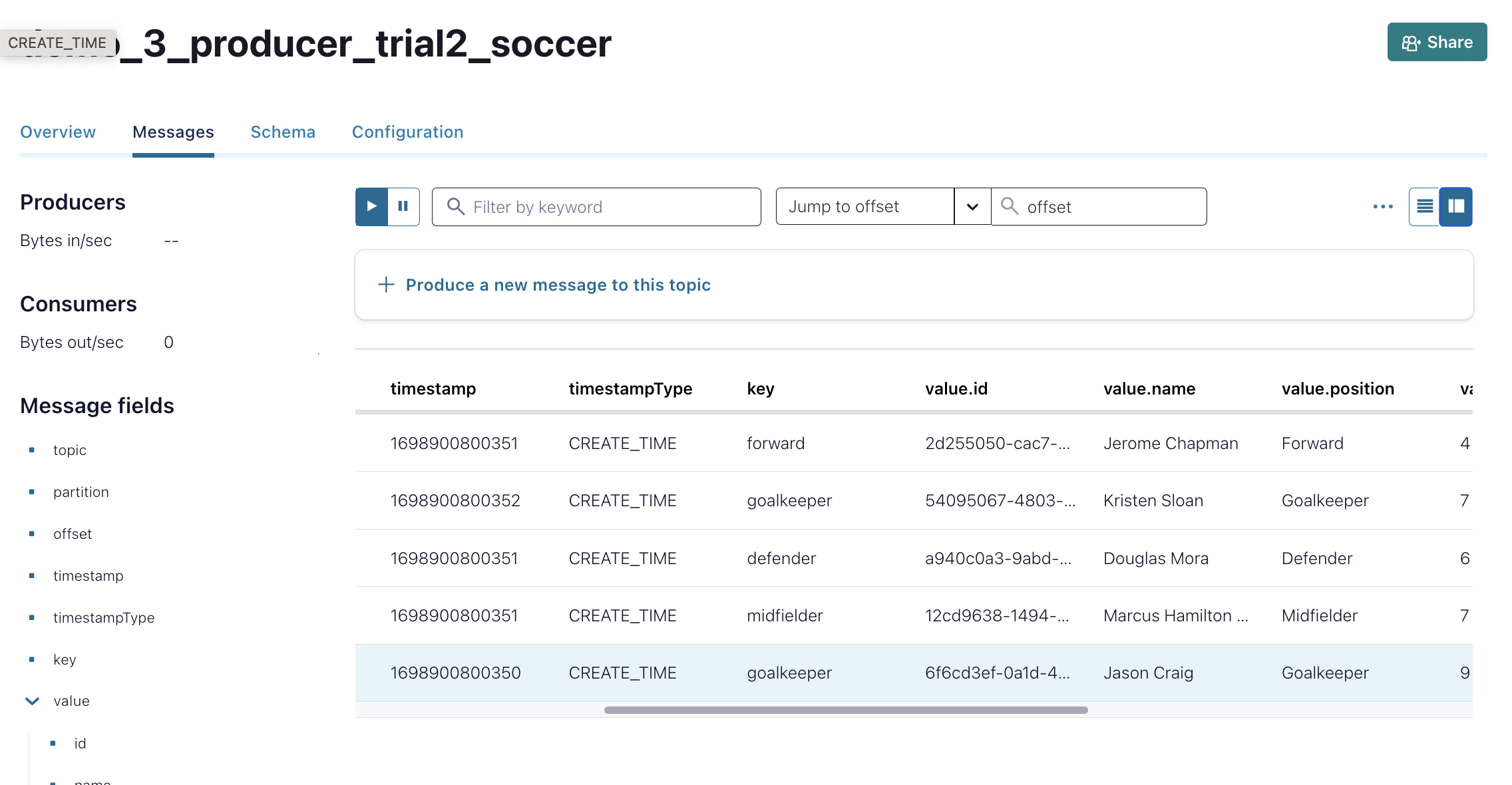
The Confluent Cloud would have the below message with 5 new soccer players.
- Kafka Environment: Given that Kafka is used as the messaging queue in your code, make sure Kafka services are up and accessible from the application server. You might need to start Kafka services or ensure network configurations permit connections.
Using the Consumer: a Simple Consumer
This demo primarily focuses on the producer.
Want to know which messages have been produced? Remember the code we wrote in Demo 2A using the python client? As long as the API key remains unchanged, we can reuse it here. Simply replace the new topic name: ./consumer.py config.ini demo_3_producer_trial1. So the consumer will display the produced information on the screen.
Exercise
Which of the following statements is true about message ordering guarantees in Kafka?
A) Messages are ordered at the partition level, not across the entire topic.
B) Messages are guaranteed to be ordered at the topic level.
C) Ordering is not guaranteed - messages may be reordered.
D) Ordering guarantees depend on the producer configuration.
Note
Answer: A
Explanation: Kafka only guarantees ordered delivery of messages within a partition, not across an entire topic. Messages published to different partitions may be reordered.
Created: 2023-11-01