Lec 2: Additional Topics
Author: Jeremy Gu
Note
In each lecture, we will have a section called "Additional Topics" covering concepts that, due to our fast-paced curriculum, we may not have time to cover in class. However, I believe understanding these is important for fully mastering data streaming. I may also include recommended readings and coding exercises to reinforce your learning. Note that additional topics will not be on the midterm exam. In your future work, I encourage revisiting these to strengthen your data streaming knowledge.
Terminology Review
| Term | Definition | Example |
|---|---|---|
| Synchronous | Operations prevent subsequent operations from starting until they are completed. | When on a phone call, you can't start a second call. |
| Sequential | Operations occur in a specific order, one after the other. | For breakfast, first brew the coffee, then fry the eggs. |
| Parallel | Multiple operations or tasks execute independently at the exact same time. | A multi-core CPU can execute multiple tasks simultaneously. |
| Concurrent | Multiple operations or tasks start within the same timeframe, but might not start at the exact same moment; they may interleave or execute simultaneously. | While cooking, you can concurrently do laundry. |
| Asynchronous | Once an operation starts, there's no need to wait for its completion; you can continue other operations. Upon completion of the original operation, a notification is typically given, often through mechanisms like callbacks. | Email is sent in the background; you're notified once it's sent. |
Note:
- Synchronous and sequential both emphasize executing in order.
- Parallel requires a multi-core CPU, while concurrency gives the impression of simultaneity through alternating execution.
- Asynchronous tasks can be executed out of order.
Example. Python's asynchronous capabilities
This python application encompasses all the logic and functions, including both the Kafka producer and the asynchronous HTTP requests (or any other asynchronous operations).
- The "application" is the entirety of your Python script or program.
- Inside this application, you have a Kafka producer (a component of the application) that sends messages to Kafka.
- You also have a function or a component in the same application that makes asynchronous HTTP requests.
Both the Kafka producer and the HTTP request component are parts of the same application and operate within it. The application coordinates the concurrent execution of these tasks using Python's asynchronous capabilities (asyncio or similar libraries).
Both tasks are initiated and managed by the same Python application, and they run concurrently.
Here's a diagram where the two parts are closer, divided by a vertical line, and both stem from the same Python App:
+--------------------------------------------------------+
|                Start Python App                        |
+--------------------------------------------------------+
              |                  |
              v                  v
   +-----------------------+  |  +----------------------+
   | Kafka Producer: Start |  |  | Start HTTP Requester |
   +-----------------------+  |  +----------------------+
              |                  |
              v                  v
   +-----------------------+  |  +----------------------+
   | Produce Message Task 1|  |  |  HTTP Request Task 1 |
   +-----------------------+  |  +----------------------+
              |                  |
              v                  v
   +-----------------------+  |  +----------------------+
   | Produce Message Task 2|  |  |  HTTP Request Task 2 |
   +-----------------------+  |  +----------------------+
              |                  |
              v                  v
        ... and so on ...        ... and so on ...
In this format:
- The top box ("Start Python App") signifies the main application where everything runs.
- The two columns underneath represent the concurrent tasks inside the app, divided by the vertical line.
- The left side is for Kafka message production.
- The right side is for making asynchronous HTTP requests.
Note : there's a crucial distinction between asynchronous programming and multi-threading:
-
Asynchronous Programming (with
asyncioin Python, for example):- Uses a single-threaded event loop to manage tasks.
- When a task is waiting for some external resource (like an I/O operation), it yields control back to the event loop, which can then execute another task.
- It doesn't run multiple tasks simultaneously but rather switches between tasks efficiently based on which task is ready to be executed.
- It's particularly useful for I/O-bound operations (like network requests or reading from a disk) where the program often waits.
-
Multi-threading:
- Uses multiple threads, which can allow for concurrent execution on multi-core systems.
- Each thread might run a separate task, allowing multiple tasks to execute simultaneously.
- This approach is more suitable for CPU-bound operations where tasks perform a lot of computations.
- It comes with overheads like thread management, potential race conditions, and deadlocks.
Fire and Forget
"Fire and Forget" is a term commonly used in distributed systems and messaging architectures to describe a pattern where the producer sends a message and doesn't wait or care about the acknowledgment of its receipt or its processing status. In the context of Kafka, this would mean sending a message to the broker without waiting for any acknowledgment of its delivery.
In the Kafka producer scenarios we discussed:
-
Asynchronous Producer: This can be considered a form of "Fire and Forget" if you remove the callbacks and the
flush()method. You just "fire" messages to the broker in a loop and don't bother checking if they were received or if there were any errors. -
Synchronous Producer: This is the opposite of "Fire and Forget." Every message is sent, and the producer waits for its acknowledgment before proceeding.
For a true "Fire and Forget" scenario with a Kafka producer in Python, the code might look something like:
from confluent_kafka import Producer

config = {
    # ... your Kafka configuration ...
}

producer = Producer(config)

def produce_messages_fire_and_forget(producer, topic_name, num_messages=10):
    """Fire and forget message production."""
    for _ in range(num_messages):
        message_value = "Some message value"
        producer.produce(topic_name, value=message_value)

# Use the function
produce_messages_fire_and_forget(producer, "your_topic_name")
In the above, messages are sent without any checks or waits for acknowledgment. This method can achieve higher throughput because it doesn't involve the overhead of checking message delivery status. However, it comes at the potential cost of not knowing about failed deliveries, so it's best used in scenarios where occasional message loss is acceptable.
Example: Uber's Big Data Stack
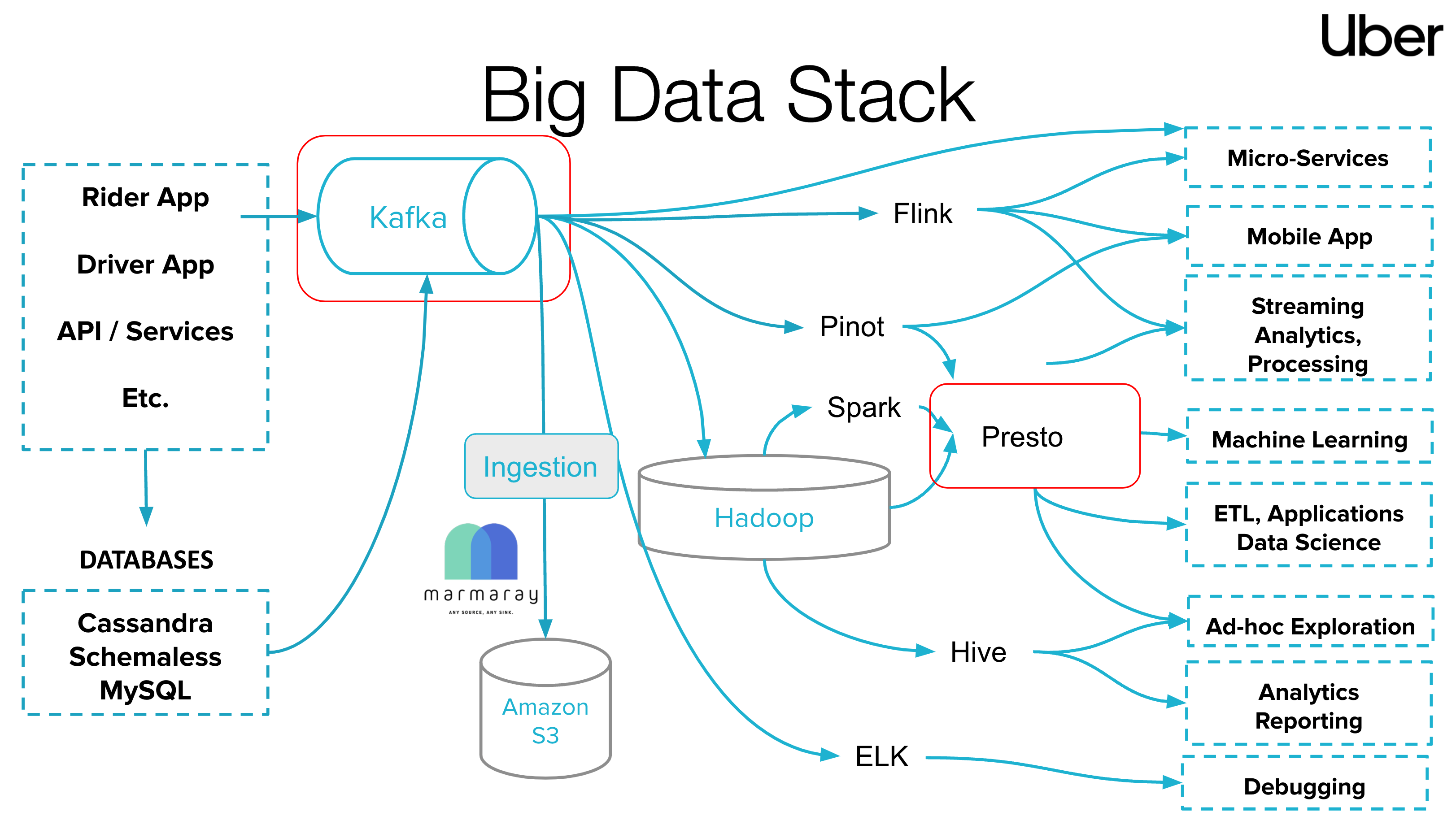
We have walked through basics of Kafka ecosystem. Next, I'd love to introduce an example of how to read industry engineering blogs that cover big data streaming systems. In the diagram above (Uber Eng Blog source1), Uber leverages a diverse set of tools and technologies to manage its vast amount of data. This stack allows Uber to efficiently process, analyze, and act upon data generated from various sources like Rider App, Driver App, and other services. The diagram illustrates the "Big Data Stack" used by Uber. The arrows between these components signify the flow of data and the relationships between various systems in the stack. Overall, the diagram provides a comprehensive view of how Uber might process, store, and analyze its big data. Let's break it down:
-
Sources: At the leftmost part of the diagram, there are sources of data such as the "Rider App", "Driver App", "API/Services", and others. These represent the various applications and services from where data originates.
- Rider App: Primarily for passengers, it collects data such as user locations, destinations, payment methods, and order histories.
- Driver App: Tailored for drivers, it captures data points like driver locations, driving routes, order information, and income details.
-
Databases: Beneath the source, you'll find different databases like "Cassandra", "Schemaless", and "MySQL". These are databases where Uber's raw data might be stored.
-
Ingestion: The center of the diagram features an "Ingestion" process. This process is responsible for taking in data from the sources and feeding it into the big data systems. The systems involved in the ingestion process are:
- Kafka: A real-time data streaming platform.
- Hadoop: A distributed storage and processing framework.
- Amazon S3: A cloud storage solution by Amazon.
-
Data Processing and Analytics:
- Flink: A stream-processing framework.
- Presto: A distributed SQL query engine.
- Pinot: A real-time distributed OLAP datastore.
- ELK: Refers to the Elastic Stack, consisting of Elasticsearch, Logstash, and Kibana, used for searching, analyzing, and visualizing data in real-time.
- Spark: A distributed data processing framework. Jobs, written using Spark's API, are divided into tasks and executed across cluster nodes. Its in-memory computing capability ensures rapid data processing.
- Hive: Used for analytics reporting, it helps extract statistical data about orders, revenues, and user behaviors.
-
End Applications: On the rightmost side, the diagram lists the potential applications or services that utilize the processed data. These include "Micro-Services", "Mobile App", "Streaming Analytics, Processing", "Machine Learning", "ETL, Applications Data Science", "Ad-hoc Exploration", "Analytics Reporting", and "Debugging".
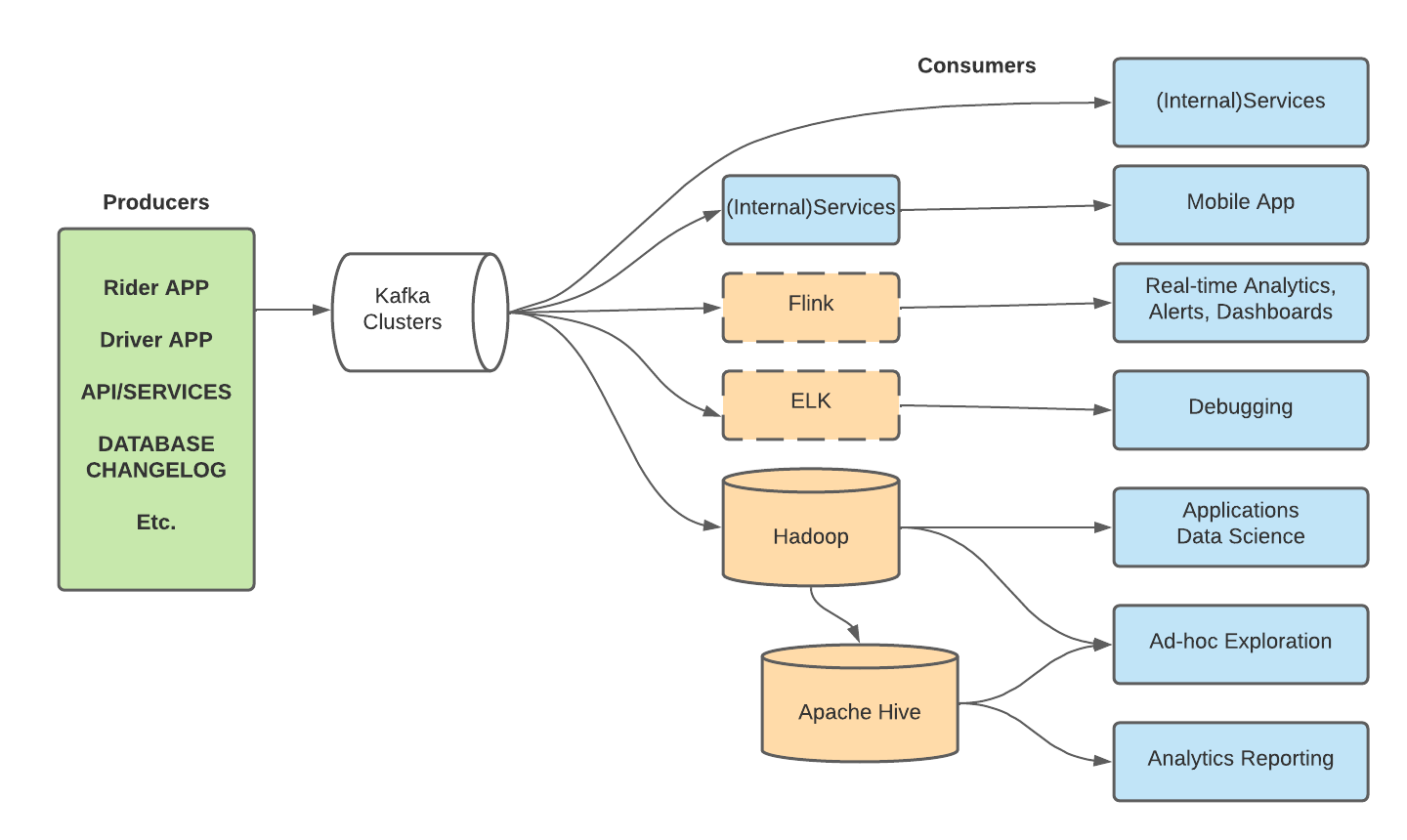
The subsequent diagram emphasizes Kafka's central role within Uber's tech stack. It facilitates numerous workflows, such as channeling event data from the Rider and Driver apps as a pub-sub message system, streaming analytics via Apache Flink, streaming database logs to downstream recipients, and ingesting assorted data streams into Uber's Apache Hadoop data lake. Considerable attention has been given to enhancing Kafka's efficiency, reliability, and user experience.
Producers:
-
Rider APP: The application used by riders to book rides. It generates events like booking a ride, ride cancellations, rating a driver, etc. These events are produced and sent to Kafka clusters.
-
Driver APP: The application used by drivers. It produces events like accepting a booking, starting a ride, ending a ride, and other driver-related activities. These events are subsequently channeled to Kafka clusters.
-
API/SERVICES: Backend services or APIs produce events or logs. This could be any interaction with the system, error logs, or any backend process that needs to be logged or analyzed.
Kafka Clusters: The above apps and services generate event data that is produced/sent to the Kafka clusters. The Kafka clusters sit at the core, tasked with receiving data from diverse producers and channeling this data to numerous consumers.
Consumers:
-
Flink: Apache Flink consumes events from Kafka for real-time stream processing. For instance, it might analyze real-time ride data for surge pricing decisions or traffic patterns.
-
Hadoop: A big data storage and processing framework, it consumes data for long-term storage and batch processing. The data consumed here might be used for trend analysis or financial reporting. Note: Flink for real-time stream processing; Hadoop for batch processing and storage.
-
Apache Hive: Operating over Hadoop, Hive consumes data to run SQL-like queries for data analysis.
-
Real-time Analytics, Alerts, Dashboards: Systems that provide real-time insights, alerts, and visualization dashboards will consume the relevant data streams from Kafka.
-
Debugging: Any system or tool used to monitor and debug issues will consume error logs or event data from Kafka.
-
Applications Data Science: Data science applications that might be building models or running experiments will consume data from Kafka for their analytics and training needs.
-
Ad-hoc Exploration: Any tool or system that needs to run exploratory analysis will consume the required datasets from Kafka.
-
Analytics Reporting: Systems designed to report and visualize data will be consuming the processed or raw data from Kafka.
-
ELK (Elasticsearch, Logstash, Kibana): The ELK stack consumes log data for analytics and visualization. It helps in monitoring and troubleshooting.
-
Real-Time Exactly-Once Ad Event Processing with Apache Flink, Kafka, and Pinot (9/2021). https://www.uber.com/blog/presto-on-apache-kafka-at-uber-scale/. Note that Marmaray is an open source data ingestion and dispersal framework developed by Uber's Hadoop Platform team to move data into and out of their Hadoop data lake. ↩
Created: 2023-09-18